

Company & Sector
The Washington Post - Homepage
Role
Co-Product Designer
Team
Ben Rubenstein, Principal Product Designer
Timeline
Nov 2024 - Mar 2025
Tools & Skills
Figma, Prototyping, Responsive Design
Project Overview
I collaborated on redesigning The Washington Post’s homepage navigation's layout and responsive behavior, balancing constraints from advertisement placement, editorial priorities, and multiple breakpoints.
Result Highlights
⟡ Unified visual hierarchy across 5 breakpoints
⟡ Optimized business goals by integrating design with new advertisement placement
⟡ Defined scroll and navigation behavior with demonstrative interactive prototypes
Our Challenge
How can we create cohesion and visual balance with our homepage navigation across all breakpoints?
The Washington Post’s homepage navigation was disjointed across all five breakpoints (mobile to desktop). Without clear guidelines, navigation patterns varied widely between screen sizes. Additionally, we also needed to integrate a new advertisement placement for wider breakpoints while maintaining visual balance and hierarchy throughout the experience.
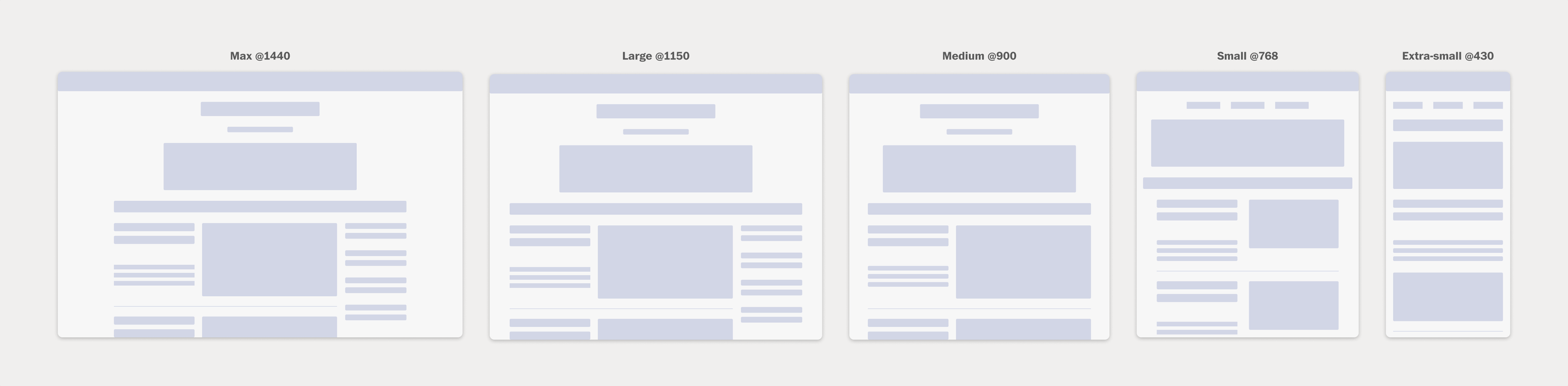
Each of the five breakpoints have inconsistent rules on navigation behavior, and need to accommodate the new advertisement placement.
Our Vision
A responsive navigation design with clearly defined component behavior.
Working closely with principal product designer Ben Rubenstein, I combined his homepage design expertise with my component systems focus to balance editorial priorities, advertising requirements, and technical constraints.
Together, we envisioned a cohesive header design that would deliver three key outcomes:
⟡ A unified visual hierarchy that adapts seamlessly across all five breakpoints (from desktop to mobile), ensuring consistent and intuitive navigation across devices
⟡ Clearly defined rules for navigation component behavior that specify exactly when elements should display, hide, stack, or transform, eliminating ambiguity and creating a maintainable system for future iterations
⟡ A restructured top-of-page architecture that naturally integrates the new advertisement placement above the header while preserving editorial content hierarchy and maintaining an intuitive user experience
The Process: Part I
Dissecting the navigation behavior and analyzing industry patterns
I began with comprehensive research, where I conducted a heuristic analysis of our existing homepage and studying how our competitors in the media industry structured their homepage navigation.
Through regular working sessions with product design stakeholders, we refined our solutions collaboratively and iteratively. This cross-functional approach ensured we met technical constraints and business requirements while maintaining high product quality.
Compilation of ideas and considerations of homepage top section designs based on an analysis of industry standards.
The Process: Part II
A balancing act between navigation, business and editorial needs
Working closely with product, monetization, newsroom, and engineering teams, Ben and I developed a top-of-homepage design that balanced key elements across multiple breakpoints: the logo, tagline, leaderboard ad, two tile ads, main navigation, live and trending bar, and an occasional breaking news bar. We created a centered navigation layout that served as a clear focal point while keeping critical features easily accessible.
Documentation from our initial workshop combining collaborative brainstorming (left) to define pagination requirements with examples of pagination patterns from other company design system pages and websites (right) to inform our component design approach and accessibility standards.
Capturing designs for edge cases, such as breaking news bar and scroll behavior.
A key part of our process was building detailed prototypes in Figma to show the scroll behavior and interaction patterns we had in mind. Since scrolling is central to the homepage experience, we created prototypes that simulated real-world usage across all five breakpoints.
These prototypes demonstrated how navigation would adapt during scroll, how elements would reposition across breakpoints, and how advertisements would integrate seamlessly. They also became essential communication tools that aligned engineering teams on interaction behaviors and gave stakeholders a tangible preview of the final experience.
Prototype of the homepage and scroll behavior. The homepage covers the leaderboard ad, and the header appears and the trending bar stacks underneath.
These prototypes demonstrated how navigation would adapt during scroll, how elements would reposition across breakpoints, and how advertisements would integrate seamlessly. They became essential communication tools that aligned engineering teams on interaction behaviors and gave stakeholders a tangible preview of the final experience.
The Result
An improved navigational user experience
The redesign transformed The Washington Post's homepage experience by improving the top navigation and layout across all breakpoints. Through a cleaner navigation structure and unified design system, we created an intuitive browsing experience that worked seamlessly on desktop, tablet, and mobile platforms while integrating essential business elements like advertisements without compromising user experience.
Through strategic planning and cross-functional collaboration, we successfully delivered a comprehensive redesign that balanced stakeholder requirements while maintaining The Post's commitment to excellence.
The updated homepage navigation design across the five breakpoints, ranging from desktop to mobile.
What I Learned
Interactive prototypes are essential communication tools for collaborating designers and for aligning with engineers.
This project taught me valuable lessons about collaboration, communication, and technical implementation:
⟡ Collaborating with experienced designers: Working closely with Ben, who had deep expertise in homepage design and breakpoint behavior, taught me the importance of asking questions and learning from teammates with specialized knowledge. His understanding of the homepage's technical constraints helped shape more realistic and implementable solutions.
⟡ Communicating with engineers through prototypes: I learned that interactive prototypes in Figma are essential tools for bridging the gap between design intent and technical implementation. They became our shared language, allowing engineers to see exactly how interactions should behave across breakpoints rather than relying on static mockups or written descriptions.
⟡ The value of comprehensive documentation: Creating detailed VQA documentation ensured that nothing was lost in translation as designs moved to development. This systematic approach to documenting edge cases, interaction states, and responsive behavior became crucial for maintaining design integrity throughout implementation.
⟡ Mastering prototyping constraints in Figma: Through building complex scroll behaviors and responsive interactions across five breakpoints, I deepened my understanding of Figma's prototyping capabilities and limitations. This hands-on experience taught me how to work within technical constraints while still creating prototypes that effectively communicated complex interactions.